Cute Cut-Reel Maker Video Crop5.32
Publisher Description



- All about video editing!
Controlling aspect ratios, transition animations, motions stickers,motion texts, text effects, templates, background music.
All these features are available in Cute Cut Animator.
▶ Add background music to video
▶ Animation maker with Magic Touch Animation
▶ Crop video to square easily
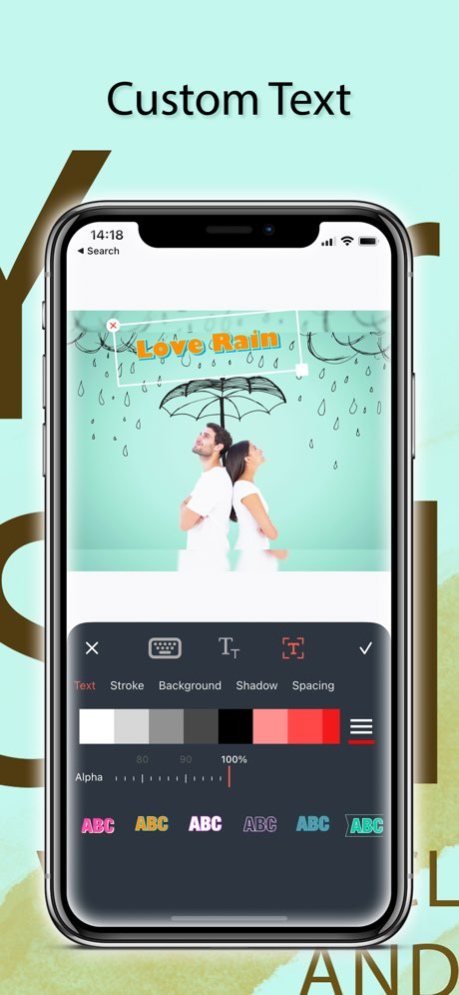
▶ Create complex text layouts:
・ Text size is changeable.
・ Text effect is changeable.
・ Text color is changeable.
・ Text gradient is changeable.
・ Text's stroke color is changeable.
・ Text's shadow color is changeable.
・ Text's background color is changeable.
・ Text is rotatable.
・ Text kerning is changeable.
・ Line spacing is changeable.
・ Curved text
▶Audio editing:
Supports multi-track audio.
Supports Background music, fade in/out effects and more.
▶Aspect Ratio control:
Supports a range of pre-defiined aspect ratios - 1:1, 16:9, 9:16
You can also the whole video to fit into the aspect ratio of the first frame.
▶Motion Stickers:
Provides 1000+ motion stickers.
You can easily control the path of a motion sticker as you want.
▶Motion Texts:
200+ Animated texts labels whose path can be easily controlled.
▶Video Resolution:
Cute Cut Animator supports upto 4K video resolution (3840x2160 pixels).
▶No Watermark:
Cute Cut Animator no longer adds Watermark in the final video.
#Cute Cut Animator offers auto-renewing subscription options:
$4.99 per month
. You can subscribe for unlimited access to all features and content offered for purchases within VONX
. Subscriptions are billed monthly on the subscription plan
. Payment will be charged to iTunes Account at confirmation of purchase
. Subscription automatically renews unless auto-renew is turned off at least 24-hours before the end of the current period
. Account will be charged for renewal within 24-hours prior to the end of the current period, and identify the cost of the renewal
. Subscriptions may be managed by the user and auto-renewal may be turned off by going to the user’s Account Settings after purchase
. Any unused portion of a free trial period, if offered, will be forfeited when the user purchases a subscription to that publication, where applicable
Terms of Use:
https://tos.vidanimate.co
Privacy Policy
https://privacy.vidanimate.co
Version History -Bug fixes and other improvements 5.32 10/26/2023 -Bug fixes and other improvements 5.31 06/23/2023 - Bug fixes and other improvements 5.30 06/22/2023 -AI Remove object in image layer 5.29 06/20/2023 Bug fixes and improvement 5.28 06/10/2023 Bug fixes and improvement 5.27 06/04/2023 - UI/UX improvements
- Fix Bugs 5.26 03/28/2023 - UI/UX improvements 5.25 03/01/2023 - Fix Bugs. 5.24 02/26/2023 - Fix Bugs.
- Import Handwriting Font from Font Maker. 5.23 01/30/2023 -Critical bug fixes 5.22 12/13/2022 - Bug fixes and Performance Improvement. 5.21 09/26/2022 - Bug fixes 5.20 09/13/2022 - Improve draw on video feature
- Bug fixes 5.19 09/12/2022 -Improve draw on video feature
-Bug fixes 5.18 09/07/2022 - We would like to introduce new feature "Draw on video"
- The app now named "Cute Cut Animator" to reflect this change 5.17 08/30/2022 - Bug fixes and improvements 5.16 07/06/2022 - Bug fixes and improvements 5.15 06/06/2022 - Bug fixes and improvements 5.14 06/06/2022 - Bug fixes and improvements 5.13 06/03/2022 - Bug fixes, other improvements and optimized editing experience. 5.12 05/13/2022 - Bug fixes, other improvements and optimized editing experience.
- Add Greeting Cards. 5.11 04/16/2022 - Update text's format.
- Bug fixes, other improvements and optimized editing experience. 5.10 04/02/2022 - Update text's curve.
- Bug fixes, other improvements and optimized editing experience. 5.9 03/18/2022 - Add Special Event.
- Bug fixes, other improvements and optimized editing experience. 5.8 11/30/2021
About Cute Cut-Reel Maker Video Crop
The company that develops Cute Cut-Reel Maker Video Crop is Polymath Company Limited. The latest version released by its developer is 5.32.
To install Cute Cut-Reel Maker Video Crop on your iOS device, just click the green Continue To App button above to start the installation process. The app is listed on our website since 2026-10-14 and was downloaded 15 times. We have already checked if the download link is safe, however for your own protection we recommend that you scan the downloaded app with your antivirus. Your antivirus may detect the Cute Cut-Reel Maker Video Crop as malware if the download link is broken.
How to install Cute Cut-Reel Maker Video Crop on your iOS device:
- Click on the Continue To App button on our website. This will redirect you to the App Store.
- Once the Cute Cut-Reel Maker Video Crop is shown in the iTunes listing of your iOS device, you can start its download and installation. Tap on the GET button to the right of the app to start downloading it.
- If you are not logged-in the iOS appstore app, you'll be prompted for your your Apple ID and/or password.
- After Cute Cut-Reel Maker Video Crop is downloaded, you'll see an INSTALL button to the right. Tap on it to start the actual installation of the iOS app.
- Once installation is finished you can tap on the OPEN button to start it. Its icon will also be added to your device home screen.
Program Details
System requirements
Download information
Pricing
Version History
version 5.32
posted on 2026-10-14
Version History -Bug fixes and other improvements 5.32 10/26/2023 -Bug fixes and other improvements 5.31 06/23/2023 - Bug fixes and other improvements 5.30 06/22/2023 -AI Remove object in image layer 5.29 06/20/2023 Bug fixes and improvement 5.28 06/10/2023 Bug fixes and improvement 5.27 06/04/2023 - UI/UX improvements
- Fix Bugs 5.26 03/28/2023 - UI/UX improvements 5.25 03/01/2023 - Fix Bugs. 5.24 02/26/2023 - Fix Bugs.
- Import Handwriting Font from Font Maker. 5.23 01/30/2023 -Critical bug fixes 5.22 12/13/2022 - Bug fixes and Performance Improvement. 5.21 09/26/2022 - Bug fixes 5.20 09/13/2022 - Improve draw on video feature
- Bug fixes 5.19 09/12/2022 -Improve draw on video feature
-Bug fixes 5.18 09/07/2022 - We would like to introduce new feature "Draw on video"
- The app now named "Cute Cut Animator" to reflect this change 5.17 08/30/2022 - Bug fixes and improvements 5.16 07/06/2022 - Bug fixes and improvements 5.15 06/06/2022 - Bug fixes and improvements 5.14 06/06/2022 - Bug fixes and improvements 5.13 06/03/2022 - Bug fixes, other improvements and optimized editing experience. 5.12 05/13/2022 - Bug fixes, other improvements and optimized editing experience.
- Add Greeting Cards. 5.11 04/16/2022 - Update text's format.
- Bug fixes, other improvements and optimized editing experience. 5.10 04/02/2022 - Update text's curve.
- Bug fixes, other improvements and optimized editing experience. 5.9 03/18/2022 - Add Special Event.
- Bug fixes, other improvements and optimized editing experience. 5.8 11/30/2021
version 5.32
posted on 2023-10-26
Oct 26, 2023
Version 5.32
-Bug fixes and other improvements
version 5.32
posted on 2023-10-26
-Bug fixes and other improvements
version 5.31
posted on 2023-06-23
Jun 23, 2023
Version 5.31
-Bug fixes and other improvements
version 5.28
posted on 2023-06-10
Jun 10, 2023
Version 5.28
Bug fixes and improvement
version 5.26
posted on 2023-03-28
Mar 28, 2023
Version 5.26
- UI/UX improvements
- Fix Bugs
version 5.16
posted on 2022-07-06
Jul 6, 2022 Version 5.16
- Bug fixes and improvements
version 5.12
posted on 2022-05-13
May 13, 2022 Version 5.12
- Bug fixes, other improvements and optimized editing experience.
version 5.11
posted on 2022-04-16
Apr 16, 2022 Version 5.11
- Bug fixes, other improvements and optimized editing experience.
- Add Greeting Cards.
version 5.10
posted on 2022-04-02
Apr 2, 2022 Version 5.10
- Update text's format.
- Bug fixes, other improvements and optimized editing experience.
